
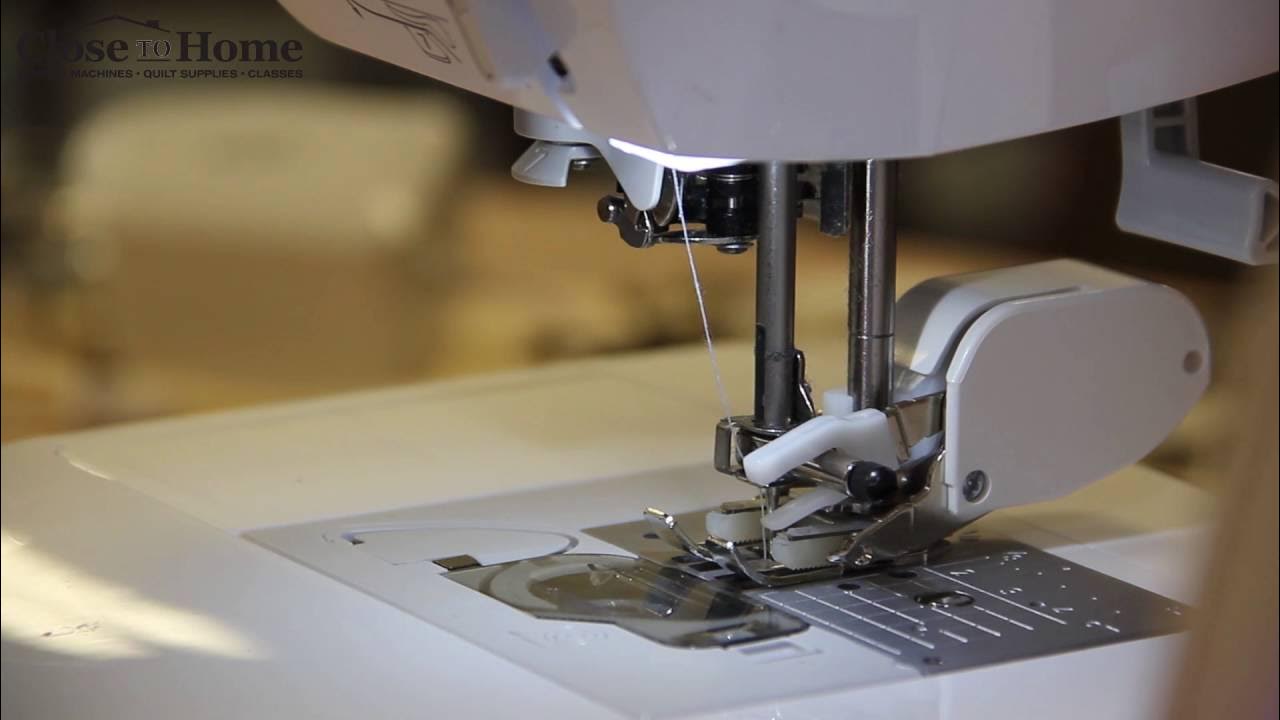
How to Put Walking Foot on Brother Sewing Machine: Easy Guide
Sewing is fun. It can also be easy. If you have the right tools. A walking foot is one such tool. It helps sew thick fabrics. Like quilts and denim. But how to use it? Let’s find out.
What is a Walking Foot?
A walking foot is a sewing machine attachment. It helps feed fabric. From the top and bottom. At the same time. This keeps layers from shifting. It is great for quilting. And sewing thick materials.
Why Use a Walking Foot?
- Prevents fabric from bunching
- Keeps stitches even
- Good for quilting
- Ideal for thick fabrics

Credit: www.youtube.com
Getting Ready to Use a Walking Foot
First, gather your tools. You will need:
- Your Brother sewing machine
- A walking foot attachment
- A screwdriver
Make sure your sewing machine is turned off. Unplug it for safety. Now you are ready.
Steps to Attach the Walking Foot
Step 1: Remove The Current Presser Foot
First, lift the presser foot lever. This raises the presser foot. Now, you can take it off. Most feet snap on and off. If yours is screwed on, use the screwdriver.
Step 2: Attach The Walking Foot
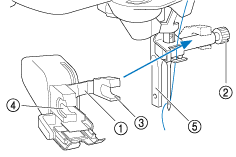
Look at the walking foot. You will see a lever. This lever goes over the needle bar. The needle bar is the metal bar. It moves up and down. Attach the lever to it.
Now, align the walking foot. It should be in line with the screw hole. Use your fingers to hold it in place.
Step 3: Secure The Walking Foot
Use the screwdriver. Tighten the screw. Make sure the foot is secure. It should not wobble. Now, lower the presser foot lever.
Testing the Walking Foot
Plug your sewing machine back in. Turn it on. Place a piece of fabric under the walking foot. Lower the presser foot lever.
Start sewing slowly. Watch how the fabric moves. It should feed smoothly. If it does, the foot is attached correctly.
Tips for Using a Walking Foot
- Use a longer stitch length for thicker fabrics.
- Sew slowly to keep control.
- Practice on scrap fabric first.
- Check the foot’s alignment regularly.
Credit: support.brother.com
Common Problems and Solutions
Sometimes, things go wrong. Don’t worry. Here are some common problems. And how to fix them.
Problem: Fabric Is Not Feeding
Solution: Check the foot’s alignment. Make sure the lever is over the needle bar. Adjust if needed.
Problem: Stitches Are Uneven
Solution: Check the fabric thickness. Adjust the stitch length. Slow down your sewing speed.
Problem: Walking Foot Is Wobbly
Solution: Tighten the screw. Make sure the foot is secure.
Frequently Asked Questions
What Is A Walking Foot On A Sewing Machine?
A walking foot helps feed thick or multiple layers evenly. It prevents fabric shifting while sewing.
How To Attach A Walking Foot On Brother Sewing Machines?
First, remove the presser foot. Then, align the walking foot and tighten the screw.
Why Use A Walking Foot For Sewing?
It ensures even feeding of fabric. Ideal for quilting and sewing stretchy materials.
Can A Walking Foot Fit All Brother Sewing Machines?
Most Brother machines accommodate a walking foot. Check your machine’s compatibility first.
Conclusion
Now you know how to use a walking foot. It is easy and helpful. Your sewing projects will improve. Especially with thick fabrics. Remember to practice. Happy sewing!
Additional Resources
For more tips, check your sewing machine manual. It has useful information. Or watch online videos. They show step-by-step guides. Enjoy learning and sewing!
![5 Best Brand Sewing Machine for Beginners [In 2026]](https://homeunderstandable.com/wp-content/uploads/2025/07/best-brand-sewing-machine-for-beginners-top-picks-for-easy-stitching-768x512.jpg)
![What Is The Best Brother Sewing Machine for Heavy Fabrics [In 2026]](https://homeunderstandable.com/wp-content/uploads/2025/07/best-brother-sewing-machine-for-heavy-fabrics.jpg)
![What Is The Best Affordable Heavy Duty Sewing Machine [In 2026]](https://homeunderstandable.com/wp-content/uploads/2025/07/best-affordable-heavy-duty-sewing-machine.jpg)
![5 Best Brother Sewing Machines for Quilting [In 2026]](https://homeunderstandable.com/wp-content/uploads/2025/07/best-brother-sewing-machines-for-quilting.jpg)