How to Take Apart Your Levoit Air Purifier Safely
Taking apart your Levoit air purifier is a pretty straightforward process. You’ll need to remove the old filter and then access the interior components for cleaning or replacement. Most models are designed for easy disassembly without special tools.
Understanding how to get inside your Levoit helps you maintain its peak performance. Regular cleaning can improve air quality and extend the life of your unit. It’s a good idea to know the basic steps before you really need them.
- Unplug your Levoit air purifier first.
- Locate and remove the filter cover.
- Gently pull out the old air filter.
- Wipe down accessible interior surfaces.
- Reassemble in reverse order.
Ready to get your hands a little dusty? Let’s walk through exactly how to take apart your Levoit air purifier step by step.
Getting Inside Your Levoit Air Purifier: A Step-by-Step Guide
So, you need to get inside your Levoit air purifier. Maybe it’s time for a good cleaning, or perhaps you’re swapping out a filter. No matter the reason, taking it apart is simpler than you might think. Most Levoit models are designed with users in mind. This means you typically won’t need any special tools. We’ll guide you through the process so you can get to the parts you need to access.
Preparing Your Levoit for Disassembly
Before you start tugging and twisting, a little preparation goes a long way. Safety first is always the rule. Think of it like preparing to cook a meal; you wouldn’t start chopping without unplugging the blender, right? The same principle applies here.
Unplugging the Unit: Your First Essential Step
This is the most important step. Always, always unplug your Levoit air purifier from the power outlet. Electricity and trying to take things apart don’t mix well. You want to avoid any accidental shocks or damage to the unit. Just a simple pull from the wall socket is all it takes.
Choosing the Right Spot
Find a clean, flat surface to work on. This prevents small parts from getting lost. It also keeps your floors or furniture from getting scratched. A dining table or a clear section of the floor can work well. Laying down a towel can offer extra protection for your surfaces and the purifier.
Accessing the Air Filter: The Main Event
The primary reason most people need to take their Levoit apart is to access the air filter. It’s usually the most frequently changed component. Levoit designs these units so filter access is pretty intuitive.
Locating the Filter Cover
On most Levoit models, the filter is housed at the bottom or back of the unit. You’ll likely see a section that looks like a separate panel or a removable base. Look for a seam or a slight indentation. Some models might have small latches or a twist-lock mechanism.
For example, many Core series models have a base that twists off. You’ll usually see arrows indicating the direction to turn. Gently grasp the sides of the base and turn it counter-clockwise. If you’re unsure, check your Levoit’s user manual. It will show you exactly where to look and how to open it for your specific model.
Removing the Old Filter
Once the cover is off, you’ll see the filter. It often looks like a cylinder or a rectangular block. It’s usually just sitting there, snug but not glued. Some filters might have a small tab or strap to help you pull them out. Just grasp the filter firmly with both hands.
Gently pull it straight out. It shouldn’t require excessive force. If it feels stuck, double-check that the cover is completely removed. Sometimes a stubborn filter just needs a little wiggle. Avoid yanking hard, as you could damage the filter housing or the purifier itself. We found that a steady, even pull is most effective.
Cleaning Accessible Interior Components
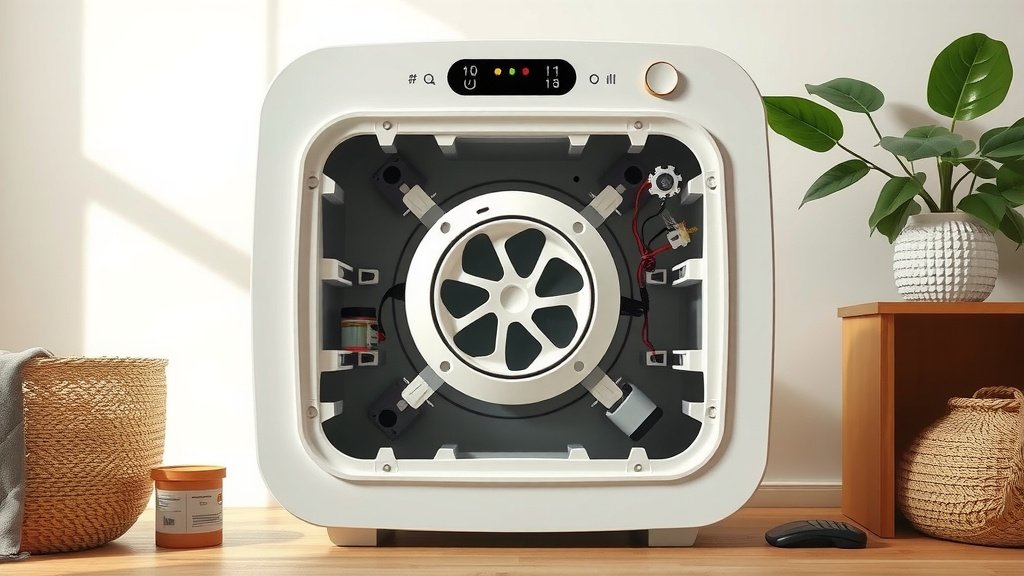
With the filter out, you can now access some of the internal parts. This is a great opportunity for a quick clean. Dust and debris can accumulate over time, impacting performance.
Wiping Down the Interior Surfaces
Take a dry or slightly damp microfiber cloth. Carefully wipe down the inside of the purifier’s casing. Pay attention to the area where the filter sits. You can also gently wipe the fan blades if they are easily accessible. Ensure they are not stiff with grime.
Make sure any cloth you use is not wet. Excessive moisture can damage the electronic components. If you need to clean stubborn dust, a soft brush or a vacuum cleaner with a brush attachment can work wonders. Just be gentle. Many experts suggest this regular dusting helps maintain airflow (CDC guidelines for home air quality).
Checking the Air Intake and Outlet Vents
Look at the air intake vents, usually around the base or sides. Dust can get trapped here. Use your cloth or brush to clear them out. The air outlet vent at the top can also collect dust. Give it a quick wipe-down. Keeping these vents clear is essential for efficient operation.
Reassembling Your Levoit Air Purifier
Putting your Levoit back together is simply the reverse of taking it apart. This part is usually even quicker!
Installing the New Filter
If you’re replacing the filter, unwrap the new one first. Make sure you have the correct filter model for your Levoit unit. Line up the new filter with the filter housing. It should slide in easily. Push it in until it sits snugly in place. Most filters have a specific orientation, so ensure it’s facing the right way if there are any markings or arrows.
Securing the Filter Cover
Now, place the filter cover back onto the unit. If it’s a twist-off base, align it with the body of the purifier. Turn it clockwise until it clicks or locks securely into place. If there are latches, make sure they snap shut. You should feel or hear it lock. This ensures the purifier operates correctly and safely.
Final Checks Before Powering On
Once everything is back in place, give your Levoit a gentle shake. Does everything feel secure? Are there any loose parts? Ensure the filter is properly seated and the cover is locked. A quick visual inspection is all you need.
Here’s a quick checklist to ensure you’ve got it all:
- Unplugged Unit: Confirm your Levoit is unplugged before starting.
- Cover Removed: Ensure the filter cover is fully detached.
- Old Filter Out: The old filter should be completely removed.
- Interior Wiped: Accessible inside surfaces are clean and dry.
- New Filter In: The new filter is properly seated.
- Cover Secured: The filter cover is locked back in place.
You’ve successfully taken apart and reassembled your Levoit air purifier! It’s a satisfying feeling to know you can perform basic maintenance yourself. This routine care will help keep your air clean and your purifier running efficiently for a long time.
Conclusion
You’ve now learned how to safely take apart and reassemble your Levoit air purifier. This simple maintenance routine is key to keeping your device running smoothly. By following these steps, you can ensure cleaner air in your home. Remember to always unplug your purifier before starting any work. Ready to put your knowledge to use? Your next step is to schedule your filter replacement and internal wipe-down for optimal performance.
Frequently Asked Questions
How often should I take apart my Levoit air purifier?
You generally only need to take apart your Levoit to change the filter, which is recommended every 6-12 months depending on usage and air quality. This is also a good time to quickly wipe down accessible interior surfaces to prevent dust buildup.
What should I do if my Levoit filter is hard to remove?
If a filter feels stuck, first ensure the filter cover is fully detached. Try gently wiggling the filter side-to-side while pulling upward. Avoid using excessive force, which could damage the purifier or the filter housing.
Can I wash the Levoit air filter?
No, Levoit air filters are typically not washable. They are designed for single use and replacement. Washing a filter can damage its material and reduce its effectiveness, potentially harming your air purifier.
Do I need any special tools to take apart my Levoit?
Generally, you won’t need any special tools to take apart most Levoit air purifiers. They are designed for easy access, usually involving twisting off a base or removing a back panel by hand. Always refer to your specific model’s manual if unsure.
Is it safe to clean the fan blades inside my Levoit?
Yes, it is generally safe to gently clean accessible fan blades. Use a dry microfiber cloth or a soft brush. Ensure the unit is unplugged and avoid using any liquids, as moisture can damage the motor and electronic components.
![5 Best Air Purifier for Cheap [In 2026]](https://homeunderstandable.com/wp-content/uploads/2025/06/best-air-purifier-for-cheap-top-affordable-options-for-fresh-air-768x384.jpg)