How to Change Your Dyson Air Purifier Filter
Putting a new filter in your Dyson air purifier is a straightforward process. You’ll want to make sure your Dyson is unplugged for safety. Then, you just need to release the old filter and pop the new one into place.
Keeping your Dyson air purifier’s filter clean is key to its performance. A clogged filter means your machine has to work harder. This can reduce the air quality it provides and use more energy. It’s a simple maintenance step that makes a big difference in your home’s air.
- Unplug your Dyson purifier first.
- Locate the filter cover or compartment.
- Remove the old filter carefully.
- Insert the new filter correctly.
- Close the cover securely.
Let’s walk through exactly how to get that fresh filter installed, step by step. You’ll have cleaner air flowing in no time!
Swapping Out Your Dyson Air Purifier Filter
Ready to give your Dyson air purifier a fresh start? Replacing the filter is like giving it a new pair of lungs. It’s a simple task that makes a big difference. We’ll walk you through it, step by step. You’ll have cleaner air circulating in no time.
Understanding Your Dyson’s Filter Needs
Your Dyson air purifier works hard for you. It captures tiny particles from the air. Over time, these particles clog the filter. This makes the machine less efficient. You might notice it running louder or not purifying the air as well. Think of it like a car engine needing an oil change. Regular maintenance keeps things running smoothly.
How Often Should You Change Your Filter?
Dyson recommends changing filters based on usage. Many models have a built-in sensor. This sensor tracks filter life. It will alert you when it’s time for a change. Typically, this is somewhere between 6 to 12 months. This can vary depending on your home environment. High-pollen seasons or homes with pets might require more frequent changes. Always check your specific Dyson model’s manual for exact guidelines.
Signs Your Filter Needs Replacing
Besides the machine’s alerts, you can often tell visually. If the filter looks visibly dirty or grey, it’s probably time. You might also notice a persistent musty smell. This smell is a sign that the filter can no longer capture odors effectively. Your air quality might also seem to be declining. If you’re dusting more often, your purifier might be struggling.
Preparing for the Filter Replacement
Before you get your hands dirty, a little preparation goes a long way. Gathering your new filter is the first step. Make sure you have the correct replacement filter for your Dyson model. Using the wrong filter could harm your machine.
Safety First: Unplugging Your Dyson
This is the most important step! You absolutely must unplug your Dyson air purifier from the wall. This prevents any accidental startups while you’re working. It’s for your safety and the machine’s. A simple pull of the plug is all it takes. Always double-check that the power cord is out of the socket.
Gathering Your Supplies
You really only need your new Dyson filter. Some people like to have a soft cloth handy. You can use this to wipe down the inside compartment. It’s a good opportunity to do a quick clean. Make sure the cloth is dry or only very slightly damp. You don’t want any moisture getting into the electronics.
The Step-by-Step Filter Replacement Process
Now for the main event! This is where you’ll swap out the old for the new. Most Dyson air purifiers have a user-friendly design for this.
Locating and Opening the Filter Compartment
The filter compartment is usually at the base or the back of the machine. For many Dyson models, you’ll see a clear seam or buttons. You might need to twist a base or press release buttons. Check the sides of the unit near the bottom. Some models have a simple latch mechanism. Others require you to lift or slide a panel off. Your user manual will show you the exact location and method for your specific model.
Common Access Methods
We found that most Dyson models use one of a few methods. Some have a twist-off base. You’ll turn it counter-clockwise until it unlocks. Other models feature push-release buttons on the sides. You press these inwards to free the cover. A few might have a simple pull tab. It’s designed to be intuitive once you find it.
Removing the Old Filter
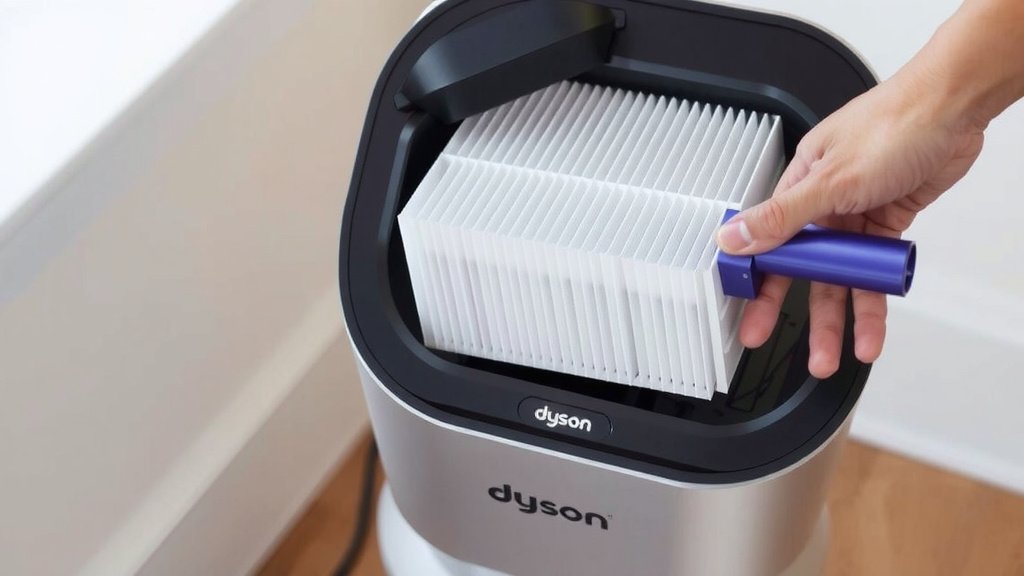
Once the compartment is open, you’ll see the old filter. It might feel a bit snug. Gently pull it straight out. It should slide out without much force. Be careful not to force it. If it’s stuck, re-check that you’ve opened the compartment fully. Avoid wiggling it too much, as this can dislodge dust. Dispose of the old filter properly. Many recycling programs accept them, but check local guidelines.
Inserting the New Filter
Take your new Dyson filter. Notice the shape and any directional arrows. Filters are typically keyed to fit only one way. Align the new filter with the opening in the purifier. Gently slide it into place. You should feel it seat firmly. There’s often a satisfying click or a snug fit when it’s correctly installed. Don’t force it if it doesn’t feel right. Double-check the orientation.
Securing the Filter Compartment
After the new filter is in, close the compartment cover. If you twisted a base off, twist it back on clockwise until it locks. If you pressed buttons, simply push the cover back into place until it clicks. Ensure it’s secure. You don’t want any gaps. A secure closure is vital for proper airflow. Your machine won’t work correctly if the cover isn’t sealed.
Post-Replacement Checks and Resetting
You’re almost done! A couple of final steps ensure your Dyson is ready to go. This confirms everything is working as it should.
Powering On and Verifying Operation
Plug your Dyson air purifier back into the wall outlet. Turn it on. You should notice the fan starting up smoothly. The air quality indicator should reset or show a healthy reading. If your model has a filter life indicator on a screen, it should now show 100% or be reset.
Resetting the Filter Life Indicator (If Necessary)
Some Dyson models require you to manually reset the filter life indicator. This is often done via a button on the remote or the unit itself. Consult your Dyson manual for the specific reset procedure. Typically, you’ll need to press and hold a specific button for a few seconds. This tells the machine you’ve installed a new filter. Without this reset, it might continue to alert you that the old one needs changing.
A Quick Checklist for Your Filter Change
Here’s a handy checklist to make sure you haven’t missed a step:
- Unplugged Power: Is your Dyson completely disconnected from the power outlet?
- Correct Filter: Do you have the right filter model for your Dyson unit?
- Old Filter Removed: Was the old filter fully removed from its compartment?
- New Filter Inserted: Is the new filter seated properly and in the correct orientation?
- Compartment Secured: Is the filter cover or base firmly closed and locked?
- Filter Indicator Reset: Did you reset the filter life indicator on your Dyson?
That’s it! You’ve successfully replaced your Dyson air purifier filter. Enjoy the improved air quality.
Conclusion
You’ve now got a clear roadmap for swapping out your Dyson air purifier filter. It’s a simple task that keeps your machine running efficiently and your home’s air clean. Remember to always unplug your unit first and ensure you have the correct replacement filter. Once the new filter is securely in place and the cover is closed, don’t forget to reset your filter indicator. Taking these steps ensures your Dyson is ready to continue purifying your air. Your next step is to schedule your filter changes to maintain optimal performance!
Frequently Asked Questions
How do I know if I’m buying the right filter for my Dyson?
You’ll want to check the model number of your specific Dyson air purifier. The packaging of the replacement filter will clearly state which Dyson models it’s compatible with. If you’re unsure, your Dyson user manual or the manufacturer’s website is the best place to confirm.
Can I just wash the old filter instead of replacing it?
No, Dyson air purifier filters are designed for single use and cannot be washed. Washing a HEPA filter will damage its delicate structure, rendering it ineffective. Always replace it with a new, genuine Dyson filter.
What happens if I don’t reset the filter life indicator after changing the filter?
If you don’t reset the indicator, your Dyson purifier will continue to believe the old filter is still in place. It will keep showing filter replacement alerts. This might also prevent the machine from performing optimally, as it won’t recognize the new filter’s presence.
Is it okay to leave the filter compartment open for a little while?
It’s best to minimize the time the filter compartment is open. This prevents dust and debris from entering the purifier’s internal components. Work efficiently to replace the old filter and secure the new one.
My new filter seems a bit difficult to push in. Should I force it?
You should not need to force the new filter. If it’s not sliding in easily, double-check that you have the correct filter model and that it’s oriented properly. Filters are often shaped to fit only one way, so ensure it’s aligned correctly before applying gentle pressure.
![5 Best Hepa Air Purifier for Viruses [In 2026]](https://homeunderstandable.com/wp-content/uploads/2025/05/best-hepa-air-purifier-for-viruses-top-picks-for-clean-air-768x512.jpg)