How to Clean Your Ion Air Purifier Effectively
The easiest way to clean your ion air purifier involves regularly wiping down its exterior and gently cleaning or replacing its filters. Keeping your ion air purifier clean is essential for its effective operation and for ensuring the air you breathe is truly fresh. You’ll want to get into a routine to maintain peak performance and prevent dust buildup.
Neglecting cleaning can reduce your purifier’s efficiency and potentially lead to unpleasant odors. Many experts say that a well-maintained ion air purifier can dramatically improve your home’s air quality. We found that a little regular upkeep goes a long way in ensuring your device continues to filter out allergens and pollutants effectively.
TL;DR:
- Unplug your purifier first.
- Wipe down the outside with a damp cloth.
- Clean or replace filters as recommended.
- Don’t forget the ion emitter.
- Regular cleaning means cleaner air.
Below, we’ll walk you through exactly how to clean your ion air purifier step by step, so you can breathe easier.
“`htmlKeeping Your Ion Air Purifier Clean for Fresher Air
You’ve got your ion air purifier working hard to make your home’s air cleaner. But just like any appliance, it needs a little TLC to keep performing at its best. Regular cleaning is your secret weapon against dust bunnies and lingering odors. We found that a little effort goes a long way to ensure it continues to filter out those pesky allergens and pollutants.
Why bother with cleaning? A dirty purifier is like a clogged filter on your car – it just doesn’t run as efficiently. It might even start recirculating dust or developing a funky smell, which is the opposite of what you want! Many experts agree that consistent maintenance is key to maximizing your air purifier’s lifespan and effectiveness (Cleveland Clinic).
Your Step-by-Step Cleaning Guide
Ready to get your hands a little dirty? Don’t worry, it’s not complicated. We’ll guide you through each step, so you can feel confident about maintaining your device. Remember, the most important first step is always to unplug the unit. Safety first, always!
Gathering Your Cleaning Supplies
Before you begin, let’s make sure you have everything you need. This will make the process smooth and quick. Think of it like prepping for a recipe; having your ingredients ready saves time.
- Soft microfiber cloths
- Mild dish soap (optional)
- Vacuum cleaner with a brush attachment
- Cotton swabs or a soft brush
- Warm water
Cleaning the Exterior: A Quick Wipe-Down
The outside of your air purifier is the most visible part, and it can collect its fair share of dust. A quick wipe can make a big difference in how it looks and feels.
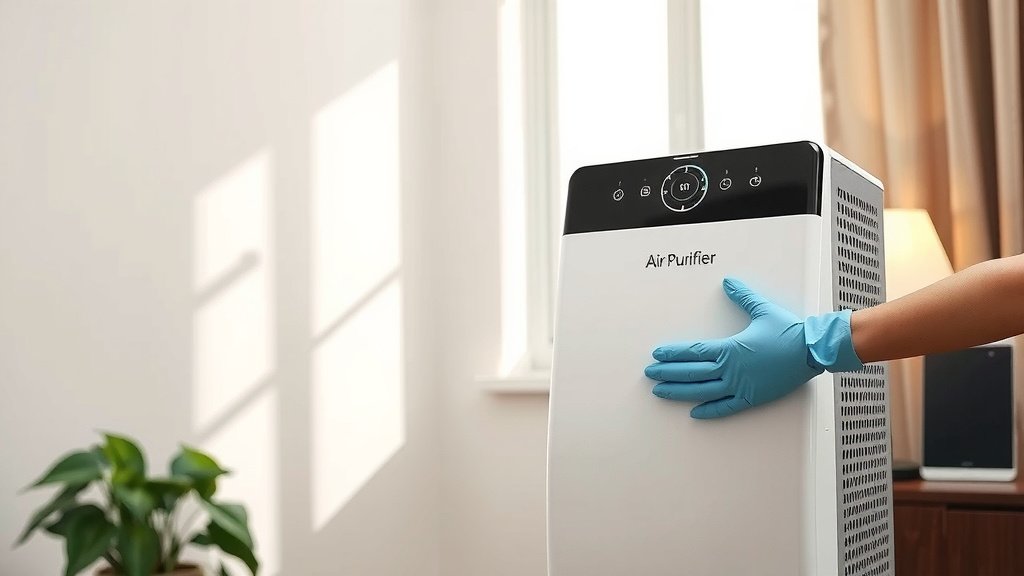
Start by using a dry microfiber cloth to dust all surfaces. For any stubborn smudges or grime, slightly dampen a clean cloth with water. If you need a bit more cleaning power, you can add a tiny drop of mild dish soap to the damp cloth. Be sure to wring out the cloth well so it’s not dripping wet. Gently wipe down the casing, paying attention to any vents or crevices where dust likes to hide. After wiping with the damp cloth, go over it again with a dry cloth to remove any moisture. You want your purifier to look as good as the air it’s cleaning!
Tackling the Filters: The Heart of the Operation
The filters are where the magic happens – they trap all the nasties from your air. Keeping them clean is absolutely critical for performance. The type of filter your purifier uses will determine how you clean it.
Pre-Filters: Your First Line of Defense
Most ion air purifiers have a pre-filter. This is usually a mesh screen designed to catch larger particles like hair and large dust. Cleaning this is often the easiest part.
You can typically remove the pre-filter by sliding or unclipping it. Once removed, take it to a sink and rinse it under lukewarm running water. If there’s a lot of dust or debris stuck to it, you might need to gently scrub it with a soft brush or a cloth. After rinsing, let it air dry completely before putting it back. Many experts recommend cleaning the pre-filter monthly, or more often if you have pets or live in a dusty area (CDC).
HEPA and Activated Carbon Filters: Handle with Care
These are the workhorses that capture smaller particles and odors. Most HEPA and activated carbon filters are not washable. They are designed to be replaced periodically.
Check your owner’s manual for the recommended replacement schedule. This can range from every 6 months to a year, depending on usage and air quality. When it’s time, simply remove the old filter and insert a new one. Trying to wash these filters can damage them and make them less effective. You can usually find replacement filters on the manufacturer’s website or through major online retailers. Investing in genuine replacement filters ensures your purifier continues to work as intended.
Cleaning the Ion Emitter or Ionizer
This is a component that actually creates the ions. It’s often a small set of metal needles or plates. These can accumulate dust and residue over time, affecting their performance.
First, ensure the unit is unplugged. You’ll likely need to access this area by removing a filter or panel. Use a dry cotton swab or a very soft, dry brush to gently clean the ion emitter. Be extremely careful not to bend or damage the emitter points. Avoid using any liquids or cleaning solutions on the ionizer itself, as this can cause damage or corrosion. If you’re unsure about accessing this part, consult your purifier’s manual or contact the manufacturer. Many sources suggest this cleaning is needed every 1-3 months.
Don’t Forget the Fan Blades
The fan is what circulates the air through your purifier. Over time, dust can build up on the fan blades, reducing airflow and potentially causing noise.
Accessing the fan blades might require a bit more effort, potentially involving removing more panels. Again, your user manual is your best friend here. Once you can reach the blades, use a vacuum cleaner with a soft brush attachment to gently remove dust. For any caked-on grime, you can use a slightly damp cloth wrapped around your finger, but ensure no water drips into the motor. It’s best to use as little moisture as possible. Make sure the fan is completely dry before reassembling and plugging the unit back in.
A Quick Checklist for Easy Maintenance
To make keeping your ion air purifier spick-and-span even easier, here’s a quick checklist you can follow. Print it out or save it somewhere handy!
- Unplug your purifier before starting any cleaning.
- Wipe down the exterior with a damp microfiber cloth.
- Clean or replace pre-filters regularly.
- Replace HEPA and carbon filters as recommended; do not wash.
- Gently dust the ion emitter with a dry swab.
- Check and clean fan blades for optimal airflow.
By incorporating these simple cleaning steps into your routine, you’re ensuring your ion air purifier can do its job effectively. This means you’ll continue to enjoy cleaner, fresher air in your home, which is a wonderful feeling. Think of it as a small investment of time for a big return in air quality.
“`
Conclusion
You’ve now got the know-how to keep your ion air purifier working its best. Regular cleaning, from wiping down the exterior to carefully tending to the filters and emitter, makes all the difference. We found that sticking to a simple schedule prevents dust buildup and ensures your purifier effectively filters out allergens. Don’t let a dirty device compromise the fresh air you deserve. Your next step is simple: schedule your first cleaning session this week to get started!
Frequently Asked Questions
How often should I really clean my ion air purifier?
It’s a good idea to wipe down the exterior and clean or check the pre-filter about once a month. For the ion emitter and fan blades, every 1-3 months is usually sufficient. Always consult your user manual for specific recommendations based on your model and home environment.
Can I use household cleaners on my ion air purifier?
Generally, it’s best to avoid harsh household cleaners. For the exterior, a slightly damp microfiber cloth is usually enough. For internal components like the ion emitter, stick to dry methods like a cotton swab. Always check your manual to see what the manufacturer recommends.
My ion air purifier smells bad, what’s wrong?
A musty or unpleasant odor often means the filters are saturated with trapped particles and odors and need replacing. It could also indicate dust buildup on the fan blades or ion emitter. Cleaning these components and replacing your filters should resolve the issue.
What happens if I wash my HEPA or carbon filter?
Most HEPA and activated carbon filters are not designed to be washed. Water can damage the delicate filter media, making them less effective or even unusable. These filters are meant to be replaced according to the manufacturer’s schedule.
Is it safe to have an ion air purifier running all the time?
Yes, it is generally safe to run your ion air purifier continuously. They are designed for long-term operation. However, remember that regular cleaning and filter replacement are still essential for them to function safely and effectively.
![5 Best Air Purifier for Dogs and Dust [In 2026]](https://homeunderstandable.com/wp-content/uploads/2025/06/best-air-purifier-for-dogs-and-dust-eliminate-odors-and-allergens.jpg)