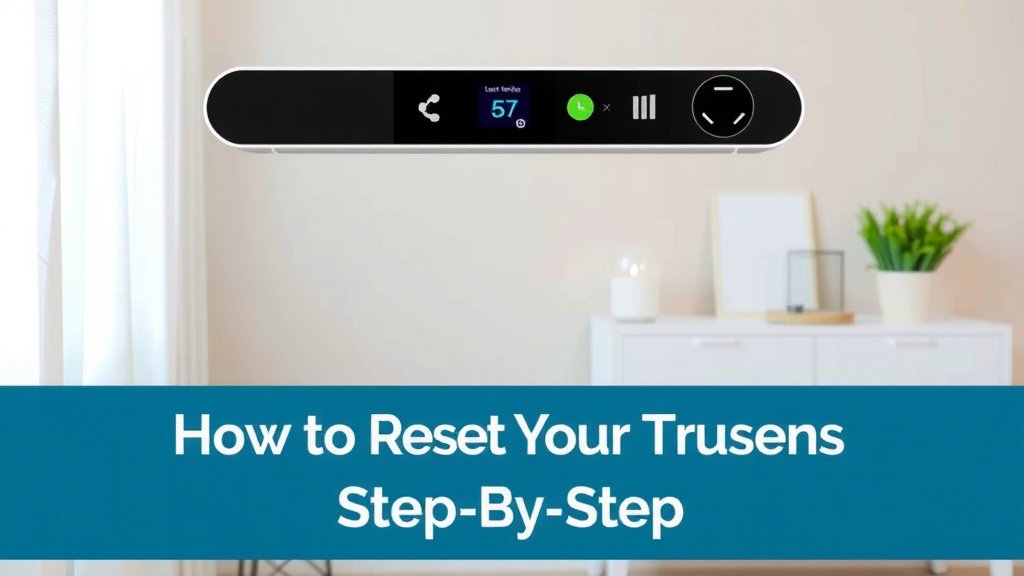
How to Reset Your Trusens Air Purifier Step-by-Step
Resetting your Trusens air purifier is usually a straightforward process. Most models require you to press and hold a specific button, often the filter reset button, for a few seconds. You’ll usually see a light turn off or hear a beep to confirm the reset is complete, helping you manage your filter life indicator.
Knowing how to properly reset your air purifier ensures it continues to operate efficiently. This simple action is key to maintaining its performance and getting the most out of your unit. It’s a small step that makes a big difference for your home’s air quality, especially for keeping track of filter replacement schedules.
- Press and hold the filter reset button.
- Look for a light or sound confirmation.
- This resets the filter reminder.
- It helps maintain purifier efficiency.
Let’s walk through exactly how to reset your specific Trusens model, step by step.
Getting Your Trusens Air Purifier Back on Track
So, your Trusens air purifier is giving you a little nudge, perhaps with a blinking light or a message indicating it’s time for some attention. This usually means it’s time to reset the filter indicator. It’s a simple maintenance step that ensures your purifier continues to do its job effectively, keeping your home’s air fresh and clean. Think of it like resetting your car’s oil change light after you’ve had the oil changed – a way for the machine to keep track.
Resetting your Trusens model is quite straightforward for most units. You’ll typically be pressing and holding a specific button. This action tells the air purifier that you’ve addressed the filter situation. It’s a key part of maintaining optimal performance and ensuring your device accurately tracks its own needs. Let’s get this done so you can breathe easy.
Understanding the Filter Reset Function
Your Trusens air purifier has a built-in system to monitor filter life. This is super helpful because filters don’t last forever. Over time, they get clogged with the very pollutants you want them to capture. When the filter is saturated, its effectiveness drops significantly. The reset function is designed to tell the purifier, “Okay, I’ve handled the filter, start the timer again.”
Why is Resetting Important?
Resetting the filter indicator is more than just turning off a light. It’s crucial for a few reasons. First, it ensures you’re alerted when it’s genuinely time to replace the filter. Continuing to use an old filter can actually worsen your air quality. Research from organizations like the EPA highlights that functioning air filters are key to reducing indoor pollutants.
Second, it helps your air purifier operate at its best. A clean, properly tracked filter allows for optimal airflow. This means your unit can efficiently circulate air and remove allergens, dust, and other airborne particles. When the indicator is reset correctly, you can trust its readings for your next filter change.
Common Trusens Reset Scenarios
Most often, you’ll need to reset the filter indicator after you’ve physically replaced the air filter. The unit doesn’t know you’ve done this automatically. It relies on you to signal the change. You might also find yourself needing to reset it if you accidentally triggered the filter alert or if you’re performing a deep clean and want to ensure all systems are fresh.
How to Reset Your Trusens Air Purifier: Step-by-Step Guides
The exact process can vary slightly depending on your specific Trusens model. However, the core action is usually the same: locating and pressing the correct button. We’ve broken down the general steps that apply to most units, and then we’ll cover some model-specific nuances.
General Reset Procedure for Most Trusens Models
This is the most common method and works for a wide range of Trusens air purifiers. It’s designed to be quick and easy.
- Power On: Make sure your air purifier is plugged in and turned on. Some resets require the unit to be powered up.
- Locate the Reset Button: Look for a button labeled “Filter Reset,” “Replace Filter,” or sometimes it’s a small icon that looks like a filter or a clock. It’s usually on the control panel.
- Press and Hold: Press and hold this button down for about 3 to 5 seconds. You might need to use your finger or a pen tip if the button is recessed.
- Confirmation: You should hear a beep or see a light turn off (often the filter indicator light itself) to confirm the reset. This means the timer has been reset.
If you hear a beep or the filter light goes out and then stays off (or returns to normal), you’ve likely succeeded! If nothing happens, try holding the button a little longer or ensure the unit is powered on.
Resetting Specific Trusens Series
While the general method is common, some series might have a slightly different approach. We’ve researched the procedures for popular lines.
Trusens Z-Series (e.g., Z-2000, Z-3000, Z-4000)
For these popular models, the process is typically very straightforward. You’ll find a dedicated button for this.
- Ensure the unit is powered on.
- Locate the button marked with a circular arrow or “Filter Reset.”
- Press and hold this button for approximately 5 seconds until you hear a beep or see the filter indicator light turn off.
This resets the filter timer for all connected filter types on those models.
Trusens Small Room Models (e.g., A2000)
Smaller units often have simplified controls.
- Turn the air purifier on.
- Find the button labeled “Filter” or an icon representing a filter.
- Press and hold this button for about 5 seconds.
- A confirmation sound or light change will indicate the reset is complete.
Trusens Models with Smart Sensors
Some models might have slightly more complex interfaces but the core reset function remains similar. The key is still identifying that specific filter reset control.
We found that in most cases, the button is clearly marked. If you’re having trouble, consult your user manual. It’s your best friend for model-specific instructions. Manuals are often available for download on the Trusens website if you’ve misplaced yours.
Troubleshooting Common Reset Issues
What if pressing the button doesn’t seem to work? Don’t worry, it happens! Here are a few things to check if your Trusens air purifier isn’t resetting.
Is the Unit Powered On?
Many reset functions require the unit to be in an active state. If your purifier is off or in standby, the button press might not register. Always ensure it’s powered on and running before attempting the reset.
Are You Pressing the Correct Button?
Double-check that you are pressing the designated filter reset button. Some control panels have multiple buttons, and pressing the wrong one won’t do anything. Refer back to your manual if you’re unsure. The correct button is usually clearly labeled or indicated with a universal symbol.
Is the Filter Actually Replaced?
While the purifier doesn’t “know” the filter is replaced, some systems might have a safety check. Ensure you’ve properly installed the new filter before resetting. Sometimes, a loose filter can prevent the system from recognizing the change.
Hold Duration Too Short or Too Long?
The timing is often critical. If you don’t hold the button long enough, the reset won’t trigger. If you hold it for *too* long, you might trigger a different function or reset the entire unit’s settings. Aim for that 3-5 second window. A little experimentation might be needed.
When to Consult Your Manual or Support
If you’ve tried these steps and your Trusens air purifier still isn’t cooperating, it’s time to consult the ultimate authority: your user manual. Your specific model might have a unique sequence or requirement. Many experts recommend keeping the user manual in a handy place for this very reason (Cleveland Clinic).
If the manual doesn’t clear things up, don’t hesitate to reach out to Trusens customer support. They have detailed knowledge of every model and can walk you through specific troubleshooting steps. Sometimes, there might be a deeper issue with the control panel or sensor that requires professional attention.
Quick Reset Checklist
Here’s a handy checklist to run through:
- Confirm Unit is On: Is your air purifier powered on and not just in standby?
- Identify Correct Button: Are you pressing the dedicated “Filter Reset” button?
- Press and Hold: Did you hold the button for the recommended 3-5 seconds?
- Listen/Look for Confirmation: Did you notice a beep or a light change?
- Check Filter Installation: Is the new filter properly seated?
- Consult Manual if Stuck: If all else fails, your manual has the precise steps.
Following these simple steps will help you quickly reset your Trusens air purifier’s filter indicator. It’s a small task that keeps your home’s air quality in check and your purifier running smoothly.
Conclusion
You’ve now learned the essential steps to reset your Trusens air purifier’s filter indicator. This simple maintenance task is key to keeping your unit running efficiently and ensuring your home’s air quality stays at its best. Remember, a correctly reset indicator means your purifier is accurately tracking filter life, helping you avoid using a saturated filter. If you ever encounter issues, your user manual or Trusens support are your best resources. For continued optimal performance, make filter replacement and resetting a regular part of your home’s upkeep routine.
Frequently Asked Questions
What happens if I don’t reset the filter indicator?
If you don’t reset the filter indicator after changing the filter, your air purifier will continue to show that the filter needs replacing. This can be confusing and might lead you to replace a perfectly good, new filter unnecessarily. Your unit might also continue to alert you about the “dirty” filter.
Can I reset the filter indicator without replacing the filter?
While technically possible by just pressing the button, it’s not recommended. The indicator is there to signal that the filter has reached the end of its effective life. Resetting it without a filter change means you’ll be running your purifier with a less effective, potentially dirty filter, which can reduce air quality.
My Trusens model isn’t listed, what should I do?
If your specific Trusens model wasn’t detailed, the general reset procedure should still apply to most units. Look for a button clearly marked “Filter Reset” or similar. If you’re still unsure, your best bet is to find and consult your air purifier’s user manual, which usually has model-specific instructions available on the Trusens website.
How long should I hold the reset button?
Typically, you’ll need to press and hold the filter reset button for about 3 to 5 seconds. Holding it for too short a time might not register the command, while holding it for too long could potentially trigger a different setting or reset the entire unit. Listen for the confirmation beep or watch for the light change.
Does resetting the filter also clean the air?
No, resetting the filter indicator does not clean the air. It’s simply a function that tells the air purifier’s system that you have addressed the filter maintenance. Actual air purification is done by the filter itself, which removes pollutants from the air as it passes through.

![5 Best Large Air Purifier for Home [In 2026]](https://homeunderstandable.com/wp-content/uploads/2025/05/best-large-air-purifier-for-home.jpg)