Fix Red Light: Turn Off Your Winix Air Purifier
To turn off the red light on your Winix air purifier, simply press and hold the filter replacement indicator button for about 3-5 seconds. This action tells the unit that you’ve replaced the filter, resetting the reminder. You’ll often hear a beep or see the light turn off to confirm the reset.
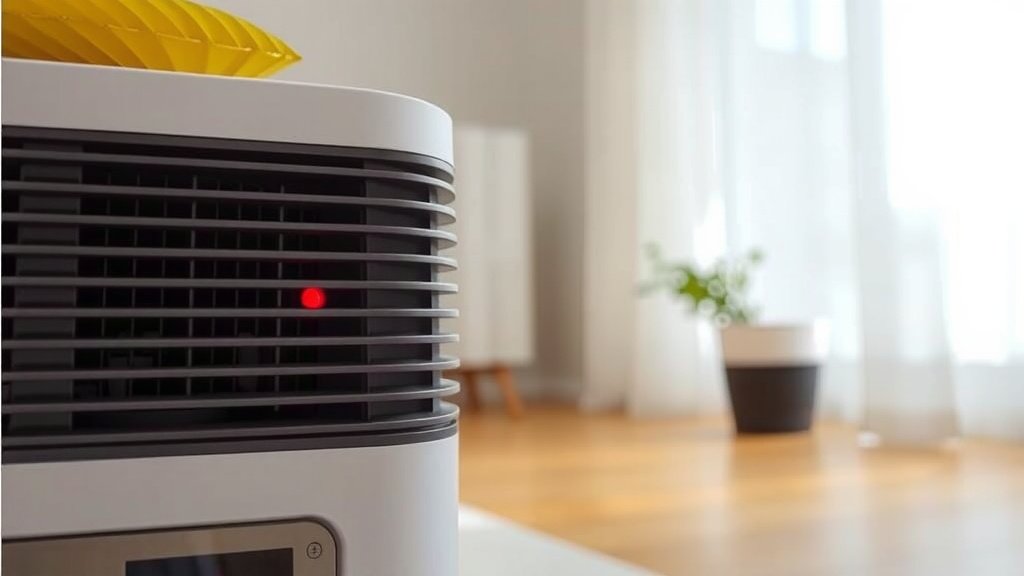
That little red light is your Winix’s way of saying “Psst, I might need some attention soon!” It usually means the filter needs to be replaced or the unit needs a good cleaning. Ignoring it won’t make the light disappear, but following the reset procedure after maintenance will. Understanding this indicator is key to keeping your air purifier running at its best.
- The red light on your Winix signals a needed filter change or cleaning.
- Press and hold the filter reset button for 3-5 seconds to turn it off.
- Listen for a beep or watch for the light to confirm the reset.
- Regular maintenance ensures optimal air purification.
Let’s get that red light off and your Winix purifier running smoothly again. Below, we’ll walk you through exactly how to do it, step by step.
Resetting Your Winix Air Purifier’s Red Filter Light
That persistent red light on your Winix air purifier is designed to be a helpful reminder. It typically signals that it’s time to change or clean a filter. Don’t worry; turning it off is usually a straightforward process. You just need to perform a specific reset action after you’ve done the maintenance. This guide will help you get that light reset so you can breathe easier.
Understanding the Red Light Indicator
Winix air purifiers use a visual indicator to let you know when a component needs attention. The most common reason for the red light is the filter replacement reminder. This feature is built into the unit to help you maintain optimal air quality. If you see the red light, it’s a prompt to check your filters. Sometimes, it can also indicate that the unit itself might need a good cleaning, especially if it hasn’t been serviced in a while.
Why is the Red Light Important?
Think of the red light as your air purifier’s way of communicating with you. If the filters are clogged or dirty, the purifier can’t do its job effectively. This means it won’t capture pollutants, allergens, and other airborne particles as well as it should. Research from the Environmental Protection Agency (EPA) highlights that regular filter replacement is key to maintaining efficient air filtration.
When to Expect the Red Light
Most Winix models have a timer built into them. This timer tracks the usage of the air purifier. After a certain period, usually around 3 to 12 months depending on the model and usage, the indicator will illuminate. This doesn’t always mean the filter is completely unusable. However, it’s a strong signal that the filter’s efficiency has likely decreased. It’s always best to check your owner’s manual for the specific timeline for your model.
Steps to Turn Off the Red Light
The procedure to turn off the red light is usually very similar across different Winix models. The core action involves pressing and holding a specific button. This action tells the purifier that you have completed the necessary maintenance, like changing the filter, and that the reminder should be reset.
Locating the Filter Reset Button
First, you’ll need to find the correct button. This button is often labeled as “Filter Reset,” “Filter Indicator,” or might have a symbol of a filter with a circular arrow. It’s usually located on the top control panel of your Winix air purifier, alongside other buttons like power, fan speed, and mode settings. Take a moment to look closely at the buttons on your unit. You should be able to identify it fairly easily.
Performing the Filter Reset
Once you’ve located the button, here’s what you need to do:
- Ensure your Winix air purifier is plugged in and turned on. Some models may require the unit to be in operation for the reset to register.
- Press and firmly hold down the Filter Reset button.
- Keep holding the button for approximately 3 to 5 seconds.
- You should hear a beep sound, or the red light might flash and then turn off. This confirms that the filter indicator has been successfully reset.
If the light doesn’t turn off after the first attempt, release the button and try again. Sometimes it takes a couple of tries to get it right. Make sure you are holding the button down continuously for the required duration.
What If the Red Light Doesn’t Turn Off?
If you’ve followed the steps and the red light remains illuminated, there are a few possibilities:
- Incorrect Button: Double-check that you are pressing the correct Filter Reset button. Some control panels can look similar.
- Holding Time: Ensure you are holding the button for the full 3-5 seconds. Holding it for too short a time won’t register the command.
- Model Specifics: While the process is generally similar, some very specific or older models might have a slightly different reset procedure. Consult your Winix owner’s manual if you have it handy.
- Filter Status: In rare cases, the system might not be recognizing that a new filter is present. Ensure the filter is installed correctly.
Beyond the Red Light: Other Maintenance Reminders
While the red light is often about filter replacement, your Winix might have other indicators. Some models feature a “Clean Filter” or “PCO” (PlasmaWave) indicator light. These lights serve similar purposes – prompting you for specific maintenance tasks.
Cleaning the Pre-Filter
Your Winix air purifier likely has a washable pre-filter. This is the first layer of defense, catching larger particles like dust and pet hair. Many experts recommend cleaning this pre-filter monthly. A dirty pre-filter can reduce the airflow and efficiency of the main filters. Cleaning it is simple: just vacuum it or rinse it under cool water, let it dry completely, and then reinsert it. Cleaning the pre-filter can sometimes help reduce the strain on your main filters.
Replacing the True HEPA and Activated Carbon Filters
The True HEPA filter is the powerhouse, capturing 99.97% of airborne particles as small as 0.3 microns. The activated carbon filter is essential for absorbing odors and VOCs. These filters are not washable and must be replaced according to the manufacturer’s recommendations, usually when the red filter indicator light comes on. After replacing these, you perform the filter reset. We found that using genuine Winix replacement filters ensures the best fit and performance.
The PlasmaWave Feature
Some Winix models include a PlasmaWave technology. This feature helps break down airborne pollutants. There might be an indicator light associated with this, or you might be prompted to clean the PlasmaWave emitter. Check your manual for specific instructions if this feature is present on your unit. It’s generally safe for most users, but if you have respiratory sensitivities, you can disable it.
A Quick Checklist for Filter Maintenance
To keep your Winix running smoothly and that red light off for good (until the next cycle, of course!), follow this simple maintenance checklist:
- Monthly: Check and clean the washable pre-filter.
- As Needed: Wipe down the exterior of the unit with a soft, dry cloth.
- When Red Light Appears: Replace the True HEPA and Activated Carbon filters.
- After Replacement: Perform the filter reset procedure.
- Periodically: Check the air intake and outlet vents for dust buildup.
- Consult Manual: Refer to your specific Winix model’s manual for detailed cleaning and replacement schedules.
Taking care of your air purifier ensures you’re always getting the cleanest air possible. That red light is just a helpful nudge to keep things in top shape.
Conclusion
You’ve now learned the straightforward steps to turn off that persistent red light on your Winix air purifier. Remember, this light is a helpful reminder to perform essential maintenance, typically a filter change. By correctly pressing and holding the filter reset button for 3-5 seconds after servicing, you tell your purifier its job is done. This ensures your Winix continues to work efficiently, delivering clean air to your home. So, go ahead, tackle that maintenance, and keep your air purifier in top condition for better breathing!
Frequently Asked Questions
How long do I need to hold the filter reset button?
You should press and hold the filter reset button for approximately 3 to 5 seconds. You’ll usually hear a beep or see the light turn off to confirm the reset. If it doesn’t work the first time, release the button and try again, ensuring you hold it for the full duration.
What if the red light stays on after I reset it?
If the red light remains on after attempting the reset, double-check that you pressed the correct button and held it for the specified time. Ensure your filter is installed properly. If the issue persists, consult your Winix owner’s manual, as some models may have slightly different procedures.
Does the red light always mean I need to buy a new filter?
The red light primarily indicates that the filter replacement timer has reached its limit, suggesting it’s time to check your filters. While it often means replacement is due, it’s good practice to inspect them first. Always refer to your Winix model’s manual for the recommended filter life and cleaning schedule.
Can I reset the light without changing the filter?
While you can technically reset the light without changing the filter by holding the button, it’s strongly advised against. The red light is an indicator of filter performance. Ignoring it means your air purifier won’t clean your air effectively, potentially compromising your indoor air quality.
Is the filter reset button the same as the power button?
No, the filter reset button is separate from the power button. You’ll typically find it on the control panel, often labeled “Filter Reset” or with a filter icon and a circular arrow. Ensure you are pressing the correct button designated for filter maintenance reminders.

![What Is The Best Air Purifier for Cat Urine [In 2026]](https://homeunderstandable.com/wp-content/uploads/2025/06/best-air-purifier-for-cat-urine-eliminate-odors-enhance-air-quality-768x768.jpg)