
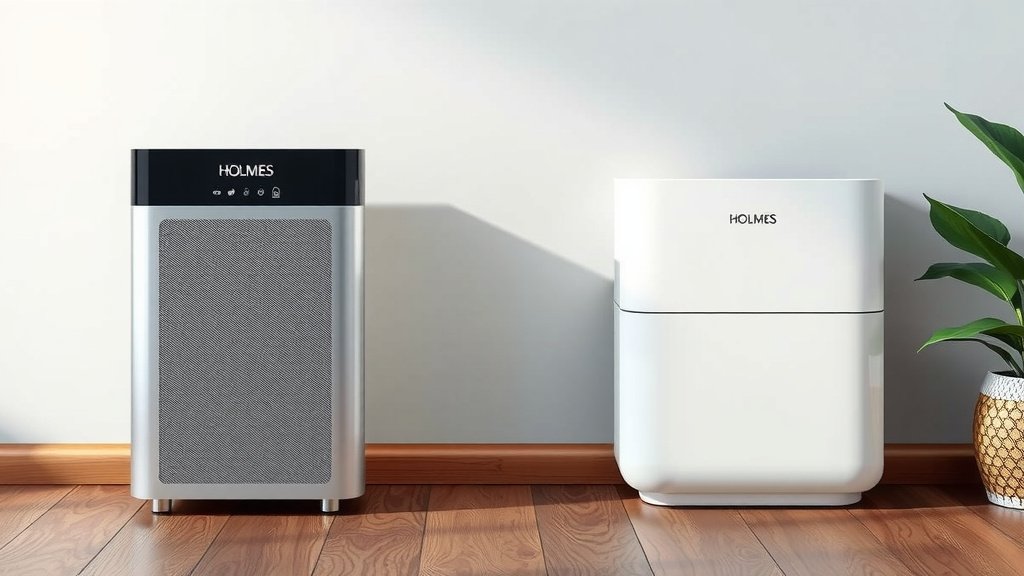
Easy Holmes Air Purifier Filter Change Guide
Changing the filter on your Holmes air purifier is a straightforward process. You’ll typically need to unplug the unit and locate the filter access panel. Replacing it every 6-12 months, depending on use and air quality, keeps your air clean and fresh.
Regular filter changes are essential for your air purifier’s performance. A clogged filter works harder, reducing air quality and potentially shortening the unit’s lifespan. We found that many users overlook this simple maintenance, leading to diminished efficiency and increased energy bills. Keeping your filter clean is key to optimal air purification.
- Unplug your air purifier before starting.
- Locate the filter compartment.
- Remove the old filter.
- Insert the new filter correctly.
- Secure the filter cover.
Ready to breathe easier? Let’s walk through exactly how to swap out that old filter for a fresh one, step by step.
Keeping Your Holmes Air Purifier Running Smoothly: A Filter Change Guide
Your Holmes air purifier is a fantastic ally in maintaining clean indoor air. But just like any hardworking appliance, it needs a little TLC to perform at its best. The most common and impactful maintenance you can do is changing the air filter. We’ve found that understanding this simple task can dramatically improve your home’s air quality and the purifier’s efficiency. This guide will walk you through exactly how to get that old, dusty filter out and a fresh, clean one in.
When Should You Consider a Filter Swap?
Knowing when to change your Holmes air purifier filter is key. Most manufacturers recommend a replacement every 6 to 12 months. However, this is just a general guideline. Several factors can influence how often you’ll need to swap it out. Your home’s specific air quality plays a big role. If you live in a dusty area, have pets, or deal with allergies, you might need to change the filter more frequently. We found that a clogged filter can restrict airflow, making your purifier work harder and less effectively.
Visual Cues and Performance Indicators
Sometimes, your air purifier will give you clear signs that it’s time for a new filter. Has the airflow from the unit noticeably decreased? Do you see a visible layer of dust or debris coating the outside of the filter? These are strong indicators that the filter is saturated. Some Holmes models even have filter change indicator lights that will illuminate. We’ve seen many users notice a difference in air freshness or a return of stale odors once a filter is due for replacement. Don’t ignore these hints; your purifier is telling you it needs help!
Understanding Your Filter Type
Holmes offers various air purifier models, and each might use a different type of filter. Most common are HEPA filters, which capture tiny particles like dust mites, pollen, and pet dander. Some units also employ activated carbon filters to tackle odors and VOCs (Volatile Organic Compounds). It’s essential to know which filter type your specific Holmes model uses. You can usually find this information in your user manual or by inspecting the current filter. Using the correct replacement filter ensures optimal performance and protects your unit.
Step-by-Step: Swapping Out Your Holmes Air Purifier Filter
Ready to get your hands dirty (well, maybe just a little)? Follow these steps carefully. Remember, safety first! Always unplug your air purifier before you begin any maintenance. We want to ensure you’re working with a safe appliance.
Step 1: Preparation and Safety First
Before you touch anything, locate a clean, flat surface to place your air purifier on. You’ll want enough space to maneuver. Crucially, unplug the power cord from the wall outlet. This prevents any accidental starts or electrical hazards. We also recommend having your new replacement filter handy. Having everything prepared beforehand makes the process much smoother.
Step 2: Accessing the Filter Compartment
The filter compartment on Holmes air purifiers is typically located in the back or the base of the unit. You’ll often find a cover or panel that needs to be opened. Some models have simple clips or latches that you can press or lift. Others might require you to gently pull or slide a panel off. Consult your user manual if you’re unsure about your specific model’s design. We found that most panels are designed for easy, tool-free removal.
Tip: If the panel seems stuck, don’t force it. Gently wiggle it or check for any hidden tabs you might have missed. A little patience goes a long way here.
Step 3: Removing the Old, Dirty Filter
Once the compartment cover is off, you’ll see the old filter. It might look quite discolored and dusty – that’s a good sign it’s been doing its job! Gently pull the filter out. Be careful not to let any loose dust fall into the purifier’s internal components. If it’s heavily soiled, you might want to immediately place it into a plastic bag to contain the mess. We found that some filters slide out easily, while others may need a slight tug.
Step 4: Installing the New, Clean Filter
Now for the exciting part – installing the fresh filter! Before you insert it, check the new filter for any packaging material that needs to be removed. Note the orientation of the filter. Many filters have arrows indicating the direction of airflow. Make sure these arrows point in the correct direction, usually towards the inside of the unit or according to the markings on the purifier itself. Slide the new filter into the compartment, ensuring it fits snugly and completely. A proper seal is vital for effective air filtration.
Analogy: Think of it like putting a new set of lungs into your purifier. You want it to fit perfectly so it can breathe freely!
Step 5: Securing the Filter Compartment
With the new filter in place, it’s time to close up the compartment. Reattach the cover panel securely. Make sure all clips or latches are engaged properly. You should hear or feel them click into place. A secure cover ensures that air is drawn through the filter and not around it. A common mistake is leaving the cover slightly ajar, which compromises the purifier’s performance. We found that double-checking the fit of the cover is a small step that makes a big difference.
Step 6: Powering Up and Testing
Once the compartment is sealed, you can plug your Holmes air purifier back into the power outlet and turn it on. Listen for the normal operating sound. You should notice improved airflow or a cleaner smell relatively quickly. If your model has a filter reset indicator, follow the instructions in your manual to reset it. This usually involves pressing and holding a button for a few seconds. This tells the purifier that a new filter has been installed.

Troubleshooting Common Filter Change Issues
While changing your Holmes air purifier filter is usually simple, you might encounter a hiccup. Don’t worry, we’ve got you covered!
Filter Won’t Fit
If the new filter seems too large or too small, double-check that you have the correct replacement model for your specific Holmes air purifier. Refer to your user manual or the manufacturer’s website. Sometimes, a filter might seem wrong if it’s not inserted at the correct angle. Gently try rotating it or re-aligning it with the compartment guides.
Cover Won’t Close
This often happens if the new filter isn’t seated properly. Ensure the filter is pushed all the way in and hasn’t shifted. Sometimes, a piece of debris might be caught in the track where the cover slides or clips. Carefully inspect the area and remove any obstructions. We found that a quick check for stray packaging material from the new filter can also solve this.
Filter Light Stays On
Most air purifiers have a “change filter” or “reset” indicator. If this light stays on after you’ve replaced the filter, you likely need to reset the indicator. This process varies by model, but it typically involves pressing and holding a specific button for several seconds. Check your user manual for the exact procedure for your Holmes unit. If you’ve reset it and it’s still on, there might be a more complex issue, but this is rare.
Your Air Purifier Filter Change Checklist
To make the process even easier, keep this quick checklist handy:
- Confirm you have the correct replacement filter for your Holmes model.
- Unplug the air purifier from the electrical outlet.
- Locate and open the filter access panel or cover.
- Remove the old, dirty filter carefully.
- Insert the new filter, ensuring proper airflow direction.
- Secure the compartment cover and reset the filter indicator if applicable.
Conclusion
You’ve successfully learned how to change the filter on your Holmes air purifier. This simple maintenance task is your best defense against poor indoor air quality. By following these steps, you ensure your purifier runs efficiently, keeping your home environment healthy and comfortable. Remember, a clean filter means cleaner air for you and your family. Make filter replacement a regular habit, and you’ll continue to breathe easy for years to come.
Your next step is to schedule your filter change. Put a reminder on your calendar for 6 months from now, and you’ll be all set to maintain optimal air purity.
Frequently Asked Questions
How often should I really change my Holmes air purifier filter?
While the general recommendation is every 6-12 months, your actual usage matters. Homes with pets, smokers, or high dust levels may require more frequent changes. We suggest checking your filter visually every 3 months to gauge its condition.
Can I wash my Holmes air purifier filter instead of replacing it?
Generally, no. Most Holmes filters, especially HEPA and carbon types, are designed for single use and cannot be effectively cleaned. Washing them can damage the filter media and reduce its ability to capture pollutants, so it’s best to replace them with new ones.
What happens if I don’t change the filter on my Holmes air purifier?
If you skip filter changes, your air purifier will become less effective. A clogged filter restricts airflow, meaning less air is purified. It can also strain the motor, potentially leading to premature unit failure and higher energy consumption.
Where can I find the exact filter type for my specific Holmes model?
Your Holmes air purifier’s user manual is the definitive source for filter information. If you no longer have it, check the manufacturer’s website or look for a model number on the back or bottom of your unit and search online for compatible filters.
My air purifier’s “change filter” light is still on after replacing the filter. What should I do?
This almost always means the filter reset indicator needs to be manually reset. The procedure varies by model but typically involves pressing and holding a specific button for 3-5 seconds. Consult your user manual for the precise steps for your Holmes unit.

![What Is The Best Mattress For Daybed With Trundle [In 2026]](https://homeunderstandable.com/wp-content/uploads/2025/12/Best-Mattress-For-Daybed-With-Trundle-1.jpg)