How to Replace Your Holmes Air Purifier Filter: A Quick Guide
Replacing the filter in your Holmes air purifier is simpler than you might think and essential for keeping your air clean. You’ll want to swap out the filter every 6 to 12 months, depending on usage and air quality, to ensure it’s working its best. Don’t worry, it’s a quick process!
A clean filter means your air purifier can effectively capture dust, pollen, and other airborne irritants. If your purifier’s performance seems to be dropping, or if it’s been a while, it’s definitely time for a fresh filter. This simple maintenance step maximizes your unit’s efficiency and keeps your home environment healthier.
- Unplug your air purifier first.
- Open the cover or access panel.
- Remove the old filter.
- Insert the new filter correctly.
- Close the unit and plug it back in.
Ready to get your air purifier breathing fresh again? Let’s walk through exactly how to replace that filter step by step.
Changing Your Holmes Air Purifier Filter: A Step-by-Step Guide
You’re probably wondering when and how often you should replace your Holmes air purifier filter. Many experts suggest a good rule of thumb is every six to twelve months. However, this can change based on how much you use your purifier and the air quality in your home. If you live in an area with high pollen counts, have pets, or someone in your household smokes, you might need to replace it more often. Think of it like changing the oil in your car; regular maintenance keeps things running smoothly.
Why Filter Replacement Matters So Much
Your air purifier’s filter is the hardworking hero, trapping all those pesky particles that float around. When it gets clogged, it can’t do its job effectively. You might notice your air purifier running louder than usual or not clearing the air as quickly. This is a clear sign the filter needs a change. A dirty filter can also become a breeding ground for mold and bacteria, which you definitely don’t want circulating in your home.
Understanding Your Holmes Air Purifier Filter
Holmes air purifiers typically use a combination filter system. This often includes a pre-filter to catch larger particles like pet hair and dust bunnies, and a main HEPA filter. The HEPA (High-Efficiency Particulate Air) filter is designed to capture 99.97% of airborne particles as small as 0.3 microns. That includes things like pollen, mold spores, dust mites, and even some bacteria and viruses. If your model has an activated carbon filter, it helps to reduce odors from cooking, smoke, and pets.
Knowing When It’s Time for a New Filter
How can you tell for sure it’s time to swap it out? Besides the general timeframe, look for visual cues. Is the old filter visibly dirty, gray, or caked with dust? Does it have an unpleasant smell? Some Holmes models even have a filter change indicator light that will alert you. If you’re not seeing an indicator light, pay attention to your purifier’s performance. A decrease in airflow or a noticeable increase in dust buildup around your home are strong signals. The EPA recommends regular filter checks for optimal performance (Environmental Protection Agency).
Gathering What You Need for the Swap
Before you begin, make sure you have everything ready. You’ll need your new, genuine Holmes replacement filter. Using a filter not specifically designed for your model can affect performance and potentially damage the unit. It’s like trying to fit a square peg in a round hole – it just won’t work right!
Choosing the Right Replacement Filter
Finding the correct filter is key. Check your Holmes air purifier’s manual for the exact filter model number. You can usually find this information on the back or bottom of your unit as well. Holmes offers various filter types, so ensure you’re getting the one that matches your specific purifier model. Many retailers offer online comparison charts to help you find the right fit. A correctly matched filter ensures maximum efficiency.
Preparing Your Workspace
It’s a good idea to perform the filter change on a flat, stable surface. Lay down a towel or some old newspaper. This will catch any stray dust that might escape when you open the purifier. You don’t want to create more mess while cleaning up!
The Step-by-Step Filter Replacement Process
Now for the main event! This process is generally straightforward. Let’s walk through it together.
Step 1: Safety First – Unplug the Unit
This is the most important step. Always unplug your Holmes air purifier from the electrical outlet before you do anything else. This prevents any accidental power surges or damage to the unit while you’re working on it. Never attempt to change a filter while the unit is plugged in.
Step 2: Accessing the Filter Compartment
Your Holmes air purifier will have a way to access the filter. This usually involves removing a cover or a back panel. Some models have latches or clips that you’ll need to release. Others might have screws. Refer to your manual if you’re unsure, but most designs are pretty intuitive. Just look for the seams where the cover meets the main body of the unit.
Removing the Old Filter
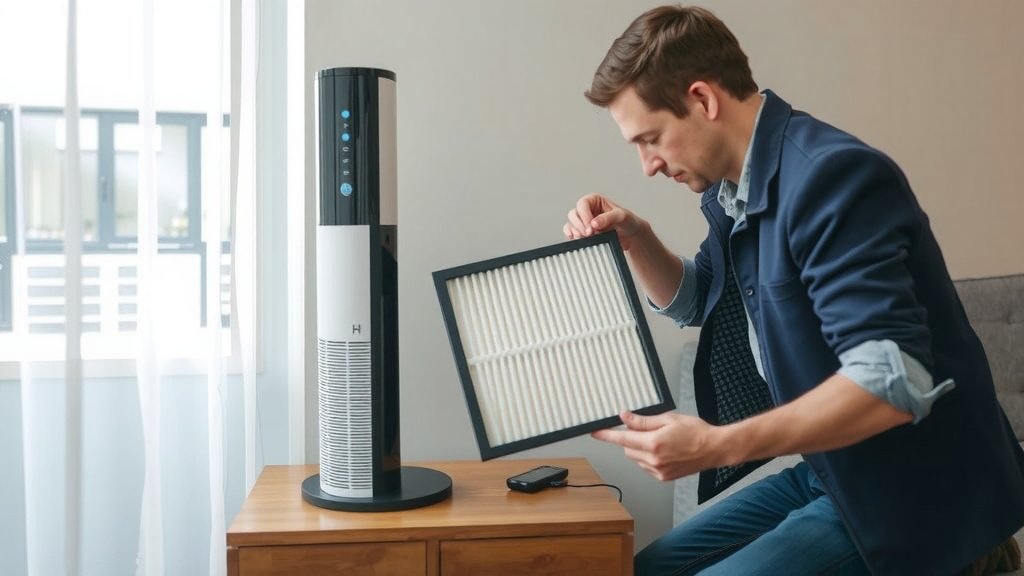
Once the cover is off, you’ll see the old filter. It might be snug, so you may need to pull it out gently. Be careful not to force it. Some filters have handles or tabs to make removal easier. As you pull it out, try to tilt it slightly to minimize dust falling onto the floor. You’ve captured that dust, so let’s try to keep it contained!
Step 3: Inserting the New Filter
Take your new filter out of its protective packaging. Look for any arrows or indicators on the filter itself. These usually show the correct direction of airflow. You want to ensure the filter is oriented properly within the purifier. The air needs to flow *through* the filter, not around it. If there are no arrows, check your purifier’s manual for guidance.
Ensuring Proper Fit
Gently slide the new filter into place. It should fit snugly but shouldn’t require excessive force. If it feels like it’s jamming, double-check the orientation and make sure there are no obstructions. A good seal is essential for the purifier to work efficiently. We want to make sure all the air passes through the filter.
Step 4: Reassembling Your Air Purifier
Once the new filter is in place, you can replace the cover or back panel. Make sure all latches, clips, or screws are secured properly. You should hear a click or feel it lock into place. A secure cover ensures the unit operates safely and effectively.
Step 5: Plugging It Back In and Powering On
Now for the final step! Plug your air purifier back into the electrical outlet. Turn it on to test. You should notice a difference in airflow and perhaps a cleaner smell almost immediately. Congratulations, you’ve successfully refreshed your air!
Troubleshooting Common Filter Issues
Sometimes, things don’t go exactly as planned. Don’t worry, most issues are easily resolved.
Filter Won’t Fit Properly
If your new filter seems too big or too small, double-check that you have the correct replacement model for your Holmes air purifier. Using the wrong filter is a common mistake. Verify the model number on your unit against the filter packaging.
Unit Not Turning On After Filter Change
If your purifier won’t power on, the first thing to check is if it’s properly plugged in. Then, ensure the cover or panel is securely fastened. Many air purifiers have safety features that prevent them from operating if the cover isn’t properly in place. You might have accidentally dislodged a connection. Also, check your circuit breaker.
Strange Noises or Smells
A new filter shouldn’t cause strange noises or smells. If you hear buzzing or rattling, the filter might not be seated correctly, or something could be loose inside. If you detect an odd smell, it might be the new filter material off-gassing slightly – this usually dissipates within a few hours. If it persists, contact Holmes customer support.
Filter Maintenance Checklist
Here’s a quick checklist to keep your filter maintenance on track:
- Confirm correct filter model for your Holmes unit.
- Unplug the air purifier before starting.
- Gently remove the old filter, minimizing dust spread.
- Insert the new filter in the correct airflow direction.
- Securely reattach the purifier cover.
- Plug in and power on to test performance.
Conclusion
You’ve now got the confidence to easily swap out the filter in your Holmes air purifier. Remember, it’s a simple task that makes a big difference for your home’s air quality. By staying on top of this routine maintenance, you’re ensuring your purifier works efficiently to capture allergens and keep your living space fresh. Don’t put it off – grab your new filter and give your air purifier a breath of fresh air today!
Frequently Asked Questions
How often should I really be replacing my Holmes air purifier filter?
The general recommendation is every 6 to 12 months. However, this can vary based on usage, pet dander, smoke, or high pollen seasons in your area. If you notice a decrease in performance or airflow, it’s likely time for a change sooner.
Can I use a generic filter instead of a genuine Holmes filter?
While generic filters might seem like a cost-saver, they often don’t fit as precisely or filter as effectively as genuine Holmes filters. Using a non-specified filter could impact your purifier’s performance and potentially cause damage.
My Holmes air purifier has a filter indicator light. Should I still check the filter manually?
Yes, the indicator light is a great guide, but it’s still a good idea to visually inspect the filter periodically. Sometimes, very specific air quality issues might clog a filter faster than the indicator anticipates. Trust your eyes and your unit’s performance.
What should I do with the old filter?
Once you’ve removed the old filter, it’s best to seal it in a plastic bag before discarding it. This helps contain any dust or allergens that were trapped inside, preventing them from becoming airborne again in your home.
My new filter doesn’t seem to have any arrows indicating airflow direction. What should I do?
If your filter lacks explicit directional arrows, consult your Holmes air purifier’s owner’s manual. It will clearly show which way the filter should be inserted for optimal airflow. Some filters have subtle clues or a specific side that should face outwards.